


Literal Word Bible App
4.91.07K Reviews
App Specs
- Version
- 4.4.9
- Updated On
- License
- Free
- Downloads
- 100,000+
- Developer
- Literal Word
- Categories
- Books & Reference
- Platform
- Android
Screenshots
 Analysis by AppCompare
I approached Literal Word Bible as something I might keep on my phone for ordinary reading rather than as an app I would open once, admire, and forget. That distinction matters with Bible apps. Many feel useful during the first few days because they put a large library in a convenient place, but the real test is whether opening them still feels natural after the initial curiosity disappears. This free Books & Reference app from Literal Word is focused tightly on Scripture, and that narrow purpose is both its clearest strength and its main limitation.
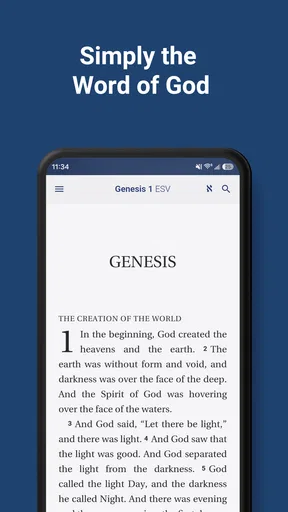
My first impression was that it understands the value of restraint. Instead of trying to become a complete religious media platform, it presents itself as a Bible-reading tool. The store summary describes it as being built around the word of God, and that focus comes through in the way I think about using it: I would reach for it when I want to read, look up a passage, or keep a regular reading habit without being pulled into unrelated content. It is available at no cost and carries an Everyone age rating, which makes it easy to recommend for households, study groups, and readers who simply want an accessible Scripture app.
What remains useful after the first week
During the first week, the strongest appeal is convenience. A physical Bible is meaningful, but it is not always beside me when I need it. A browser search is quick, yet it often sends me through pages, advertisements, commentary, or search results before I reach the text. Literal Word sits between those two experiences: more focused than a web search and easier to carry than a printed volume. That makes it especially practical for a short morning reading, a quiet evening, or a moment when I remember a verse but not its exact location.
One realistic routine would be using it during a commute or lunch break. I could choose a manageable passage, read without preparing a study desk, and close the app when the time is over. The important benefit is not that it turns a brief reading into a dramatic event. It is that the barrier to beginning is low. When an app has one obvious reason to exist, I spend less time deciding what to do and more time actually reading.
I also found the focused identity helpful for people who already know what they want from a Bible app. Someone looking for Scripture first will likely appreciate not having to sort through a crowded collection of inspirational posts, videos, devotionals, and social features. That does not make those additions bad; they can be valuable in the right context. It simply means this application is easier to judge by a quieter standard: does it help me return to the text consistently?
The developer, Literal Word, has kept the product recognizable as a dedicated Bible app rather than stretching it into a general-purpose faith platform. That clarity gives the app a certain calmness. I would be comfortable suggesting it to a reader who feels overwhelmed by feature-heavy alternatives and wants to begin with a straightforward Scripture habit.
Its public reception also suggests that the experience connects with many users. It holds a 4.9 average from around 3.5 thousand ratings, with roughly 1.1 thousand written reviews and more than 100 thousand installs. Those figures do not replace personal testing, but they do make the app easier to take seriously than an obscure download with little visible use. More importantly, they fit the app’s strongest quality: it is trying to solve a specific problem rather than impress me with a long list of unrelated capabilities.
Worth Reading Before You Choose

EA SPORTS FC Mobile 26 Is a Bigger Football Game, but It Takes Time

Flipboard Shows What News Apps Must Do Beyond the Feed

Switching to Android Auto Means Rethinking Your Driving Routine

Google Calendar Makes a Crowded Week Easier to Manage

Ludo King Makes the Most of the Minutes Between Plans

Baby Panda World Brings Quick Play to Modern Phones, but Its Game Library Feels Busy
A better way to test it than simply installing it
I would not judge Literal Word after opening it once and scrolling through a few chapters. A fair test is to give it a small, repeatable job. For example, I might use it for a short reading at the same point in my day for a week, then ask whether returning feels effortless or whether I keep reaching for another source. This reveals more than a first glance because Bible apps succeed through repetition, not novelty.
Another useful test is to use it when I already have a question in mind. Rather than wandering through the app, I would start with a passage I know, compare how quickly I can reach it, and then read the surrounding section instead of isolating one sentence. That workflow helps prevent the common habit of treating a Bible app like a quote-search engine. The app becomes more valuable when it supports sustained reading rather than only emergency lookups.
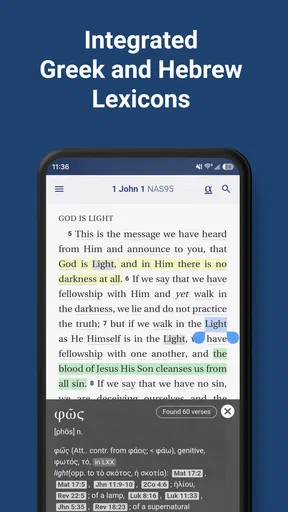
There is also a practical trade-off here. A focused reader may feel refreshingly uncluttered, but a user who wants extensive study aids may find the experience too narrow. If my normal routine depends on multiple translations, detailed cross-references, original-language tools, audio, reading plans, or a large commentary library, I would compare those needs carefully with what this app actually offers before making it my only Bible resource. Literal Word’s appeal is concentration, not the promise of replacing every study tool.
Why month-to-month use depends on habit
After the first month, the question changes from “Is this convenient?” to “Does it help me keep returning?” In my experience, the answer depends less on visual polish than on whether the app fits a routine I already understand. I would pair it with a specific cue: after coffee, before bed, or immediately after writing a daily note. The app itself cannot create commitment, but its single-purpose design removes one excuse for postponing the reading.
That makes it suitable for several kinds of readers. A beginner may use it as a low-pressure starting point before buying a print Bible or exploring deeper study. A regular churchgoer may want a pocket reference during the week. A reader who travels often may prefer having Scripture available without carrying another book. Even someone who owns several physical Bibles could use it as a backup for moments when those books are not nearby.
The recurring value is strongest when I read complete sections instead of jumping randomly between isolated verses. A useful personal workflow would be to choose one book, continue in order, and mark the end of each session mentally or in a separate note. This approach gives the app a role in an ongoing practice. Without that structure, it can become another icon I open only when a verse is mentioned in conversation.
I would also avoid making the application responsible for every part of my study. It works better as the dependable reading layer in a broader routine. I might read in Literal Word, write a question in a notebook, and consult a trusted print or digital reference only when I need more context. That division of labor is healthy. It keeps the app from feeling inadequate simply because it is not designed to be an entire library of theology.
Maintenance is light, but attention still matters
The current version is 4.4.9, and the app supports devices running Android 6.0 or later. Those details make it approachable for people who are not using the newest phone. I would still keep the app updated when updates are available, particularly for a reading tool that I want to trust over time. Maintenance is not only about new features; it can also affect compatibility, stability, and the general confidence that the app will remain usable as the phone changes.
From a user’s perspective, the maintenance burden is relatively small because the product has a narrow purpose. I do not need to learn a complicated content system or constantly reorganize a large collection just to read. The more important maintenance is personal: keeping a realistic schedule and deciding what kind of reading I want to do. If I set an ambitious plan that does not fit my life, I may blame the app for a habit that was poorly designed from the beginning.
There is a subtle advantage to using a dedicated Bible app instead of relying on a browser bookmark. A browser session is easy to interrupt with unrelated tabs, notifications, and searches. A focused app gives the reading its own place. That separation can make a difference when I am trying to protect a few quiet minutes. On the other hand, a dedicated app is another installed tool to maintain, so someone who reads comfortably through a mobile browser may not feel a strong reason to add it.
I would also think about storage and device context in a practical way. On an older phone, a simple reading experience is more appealing than a large multimedia application. On a tablet, the same app may feel more comfortable for longer sessions, while a small phone screen may encourage shorter readings. These are not reasons to reject it; they simply affect whether the app becomes a daily companion or an occasional reference.
Where long-term fatigue can appear
The main source of fatigue is repetition without a personal reading plan. Because the app is centered on Scripture, it may feel wonderfully direct at first and then less engaging if I expect the software itself to provide constant novelty. This is not necessarily a defect. A Bible is not supposed to behave like an endless social feed. Still, users who need fresh prompts, guided reflections, audio presentation, or community interaction may eventually prefer a broader alternative.
Another possible friction point is the difference between reading and studying. Looking up a passage is not the same as understanding its historical setting, literary structure, or relationship to other passages. If I use Literal Word for serious preparation, I would want a separate system for notes and research unless the specific tools I need are clearly available in my setup. The app can support the reading foundation, but I would not automatically treat it as a complete scholarly workspace.
There is also a risk of shallow use. Digital access makes it easy to search for a familiar line, read only that line, and leave. I get more from the app when I resist that impulse and read the surrounding paragraphs or chapter. A simple trick is to begin with the passage I was looking for, then continue beyond it before closing the app. That turns a quick lookup into a small act of context-building and gives the tool more lasting value.
Users who prefer a highly visual experience may find the focused approach less stimulating than alternatives filled with illustrations, media, or guided content. Conversely, those additions can be distractions for readers who want the text to remain central. The right choice depends on what usually causes me to stop reading. If I need encouragement and structure, a richer app may serve me better. If I need fewer interruptions, Literal Word makes the stronger case.
Who should keep it installed
I think this app is a good fit for readers who want a free Bible app with a clear purpose, especially people building a regular reading habit or looking for a convenient Scripture reference. Its Everyone rating also makes it a comfortable option to consider for mixed-age households, though each family should still decide how children use any device. The lack of a purchase barrier makes experimentation easy: I can try it as a secondary reading tool without committing money or replacing my existing Bible immediately.
I would be more cautious if my priority is an all-in-one study environment. Someone who needs a deep research library, extensive annotation, or a broad set of media features may be happier with a more expansive Bible platform. The same applies to readers who already have a reliable workflow and do not want another app. Installing a tool is not automatically an improvement; it should earn its place by making a real routine easier.
For me, the best role is dependable and modest. I would keep it available for daily reading, quick passage checks, and travel, while using other resources when I need interpretation or detailed study. That combination avoids demanding that one app do everything. It also gives Literal Word a fair chance to succeed at the job it appears designed to do: keeping Scripture close and easy to open.
My long-term verdict
Novelty is not the reason I would continue using Literal Word. Its lasting value comes from how little it asks of me before I can begin reading. The application is free, focused, and accessible on older Android devices, with a strong 4.9 average and a substantial group of users behind it. Those are useful signs, but the decisive question is personal: will I open it regularly instead of merely appreciating its presence?
In my case, I would recommend keeping it installed if the goal is a simple, repeatable Scripture habit. I would use a fixed daily cue, read in sequence rather than relying only on searches, and keep a separate notebook or reference source for questions that require more depth. Those small choices address the app’s central trade-off: its focus keeps reading uncomplicated, but it also means the reader supplies much of the structure.
Literal Word earns lasting space when I want Scripture to be the main event, not one feature among many. It is not the obvious choice for every kind of Bible study, and readers seeking a rich multimedia or research-heavy experience should compare alternatives. But for a person who wants a calm, free, dedicated reading companion that can become part of an ordinary routine, I find its restraint more valuable than flashy extras. That is a strong reason to recommend it to a friend who has been meaning to read more consistently but keeps waiting for the perfect setup.
Pros
- Simple interface makes Bible reading easy for all ages.
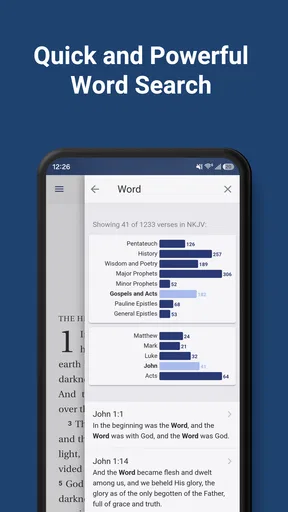
- Powerful search helps locate verses
- topics
- and passages quickly.
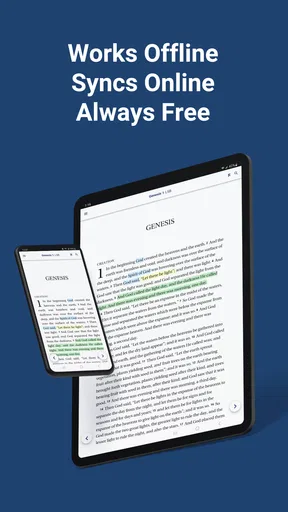
- Offline access lets you read without a mobile data connection.
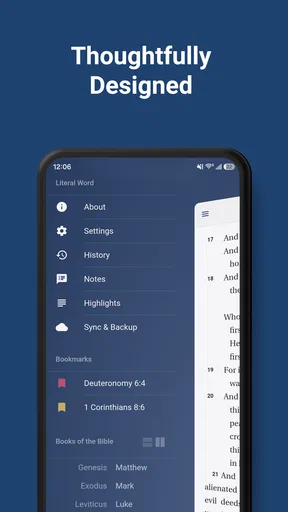
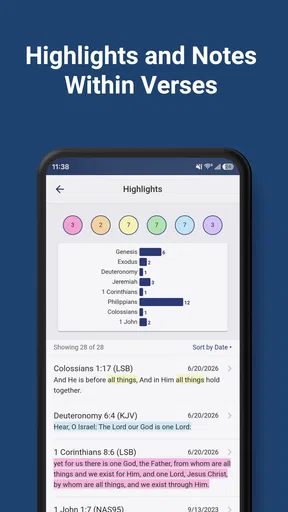
- Bookmarking and note tools support personal study and reflection.
- Multiple reading options make longer study sessions more comfortable.
Cons
- Some features may require an internet connection to work properly.
- The literal translation style can feel rigid or less natural to read.
- Limited customization may disappoint users wanting advanced study tools.
- Ads or promotional elements may interrupt the reading experience.
- Audio
- commentary
- or translation availability may vary by device.
FAQs for Literal Word Bible App
What is the Literal Word Bible App?
Literal Word Bible is a Bible study app designed for readers who want a more direct and detailed look at the biblical text. It commonly presents a literal-style English translation along with tools such as verse navigation, search, notes, and reading options. It can be useful for personal study, comparing passages, and examining wording more closely than in a paraphrased Bible version.
Is Literal Word Bible suitable for beginners?
The app can be used by beginners, although its literal translation style may feel more formal or less conversational than modern devotional Bibles. New readers may benefit from using the app alongside a simpler translation or a study resource that explains historical and theological context. Its straightforward layout and search features make it relatively easy to explore books, chapters, and individual verses.
What features does Literal Word Bible offer for Bible study?
Literal Word Bible focuses on convenient access to Scripture and may include features such as book and chapter browsing, keyword search, bookmarking, highlighting, notes, and adjustable reading settings. Depending on the device version, users may also find cross-references, parallel translation options, or sharing tools. These features make it practical for studying specific words, revisiting passages, and organizing personal observations.
Can I use Literal Word Bible without an internet connection?
Offline availability can depend on the version of the app and the content downloaded to your device. After installation, some Bible text may remain accessible without an internet connection, while additional resources or certain functions may require online access. Before traveling or relying on the app in an area with limited service, open several books and passages to confirm that the required content works offline.
Is Literal Word Bible free to download and use?
Literal Word Bible may be available as a free download, but the exact features, advertisements, optional purchases, or premium resources can vary between Android and iOS versions. Users should review the store listing before installing to check for subscription details and in-app purchases. The core Bible-reading experience may be free, while advanced study tools or extra content could require payment.


